一、什么是前后端分离
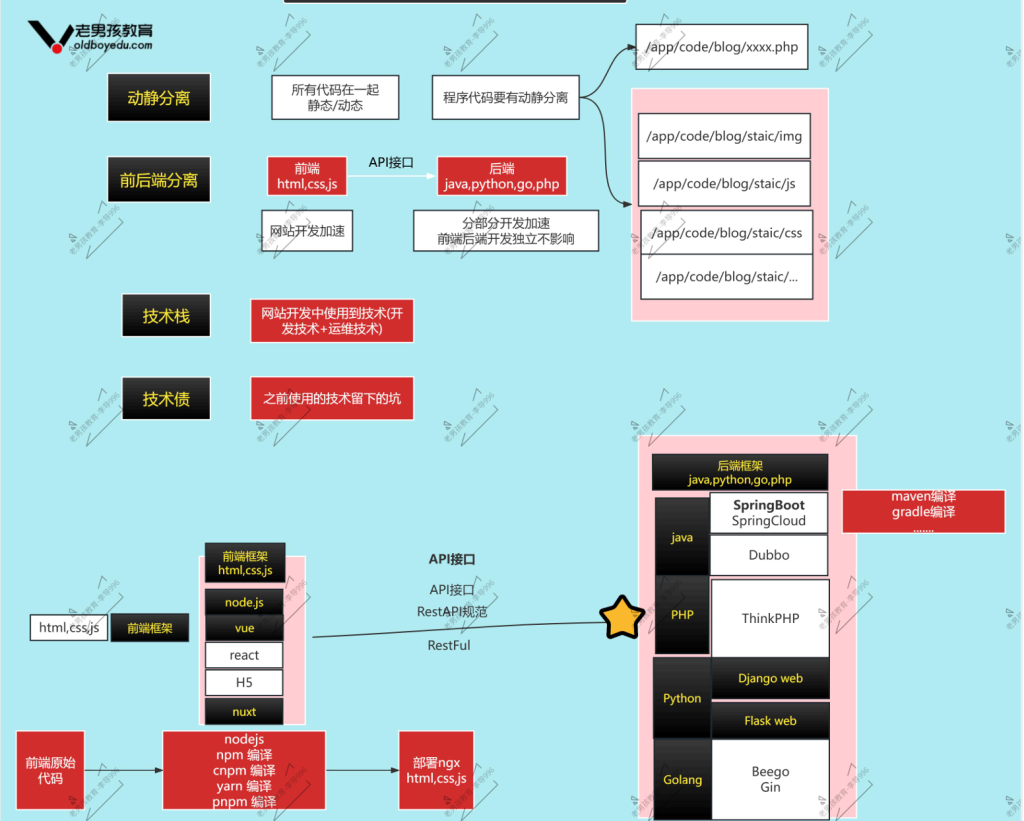
- 动静分离:
- 本质静态资源ngx处理,动态资源tomcat/jar
- 理想情况代码中分为2个部分 动态,静态 专业的静态目录(html,css,js,图片)
- 前后端分析:
- 动静分离进阶版本,2份代码
- 前端代码(静态代码):展示看见内容 只需要ngx即可
- 后端代码(动态代码):动态功能注册,登录,发布文章,发布产品,购买,需要与数据打交道
- php,java,python,golang….
- 技术栈与开发框架
二、前后端项目-快速验证测试
| 角色 | 说明 | ip |
|---|---|---|
| web03 | 前端+后端 | 10.0.0.9/172.16.1.9 |
| db02 | mysql 8.0 | 10.0.0.52/172.16.1.52 |
2.1db02
mysql 8.0 部署流程我放在了http://159.75.135.202/2026/03/06/mysql-8-0-%e9%83%a8%e7%bd%b2/ 进行查看
#创建数据库
create database exam charset utf8mb4;
#创建用户,设置密码并加入白名单
creat user ‘exam’@’172.16.1.%’ identified with mysql_native_password by ‘lidao’
grant all on exam.* to ‘exam’@’172.16.1.%’;
#查看
select user,host,plugin from mysql.user;
show grants for ‘exam’@’172.16.1.%’;
create database exam charset utf8mb4;
#创建用户,设置密码并加入白名单
creat user ‘exam’@’172.16.1.%’ identified with mysql_native_password by ‘lidao’
grant all on exam.* to ‘exam’@’172.16.1.%’;
#查看
select user,host,plugin from mysql.user;
show grants for ‘exam’@’172.16.1.%’;
- 建表语句
- 代码创建:数据库表,安装代码的时候,代码连接库创建表
- 通过建表语句/文件创建:开发人员拿到建表语句(文件),执行文件即可
mysql exam <xzs-mysql.sql
库名
mysql -uroot -plidao exam <xxxx.sql #未来有密码的使用方法
库名
mysql -uroot -plidao exam <xxxx.sql #未来有密码的使用方法
2.2web03
2.2.1后端
#创建backend目录
mkdir -p /app/code/exam/backend
#将文件xzs-3.9.0.jar与application-prod.yml放入改目录下
#进入application-prod.yml文件修改内容
vim application-prod.yml
#内容为:
把mysql://数据库地址:端口号/库名字?行下面的password改为你的数据库密码lidao
#最后启动
在/app/code/exam/backend目录下运行
java -Duser.timezone=Asia/Shanghai -jar -Dspring.profiles.active=prod xzs-3.9.0.jar
#书写systemctl文件后台运行即可
创建教程我放在了(修改运行代码即可)http://159.75.135.202/2026/03/03/%e9%9b%86%e7%be%a4%e6%9e%b6%e6%9e%84-web%e9%9b%86%e7%be%a4-tomcat/#header-id-7
mkdir -p /app/code/exam/backend
#将文件xzs-3.9.0.jar与application-prod.yml放入改目录下
#进入application-prod.yml文件修改内容
vim application-prod.yml
#内容为:
把mysql://数据库地址:端口号/库名字?行下面的password改为你的数据库密码lidao
#最后启动
在/app/code/exam/backend目录下运行
java -Duser.timezone=Asia/Shanghai -jar -Dspring.profiles.active=prod xzs-3.9.0.jar
#书写systemctl文件后台运行即可
创建教程我放在了(修改运行代码即可)http://159.75.135.202/2026/03/03/%e9%9b%86%e7%be%a4%e6%9e%b6%e6%9e%84-web%e9%9b%86%e7%be%a4-tomcat/#header-id-7
http://10.0.0.9:8000/ 学生端 用户student 密码123456
http://10.0.0.9:8000/admin 教师端 用户admin 密码123456
http://10.0.0.9:8000/admin 教师端 用户admin 密码123456
2.2.2前端
#创建子配置文件exam.oldboy.cn
vim /etc/nginx/conf.d/exam.oldboy.cn
#内容
server {
listen 80;
server_name exam.oldboy.cn;
root /app/code/exam/frontend/student;
location / {
index index.html;
}
location /api {
proxy_pass http://10.0.0.9:8000;
}
}
server {
listen 80;
server_name admin.exam.oldboy.cn;
root /app/code/exam/frontend/admin;
location / {
index index.html;
}
location /api {
proxy_pass http://10.0.0.9:8000;
}
}
vim /etc/nginx/conf.d/exam.oldboy.cn
#内容
server {
listen 80;
server_name exam.oldboy.cn;
root /app/code/exam/frontend/student;
location / {
index index.html;
}
location /api {
proxy_pass http://10.0.0.9:8000;
}
}
server {
listen 80;
server_name admin.exam.oldboy.cn;
root /app/code/exam/frontend/admin;
location / {
index index.html;
}
location /api {
proxy_pass http://10.0.0.9:8000;
}
}
三、前后端项目-集群模式
3.1 L4 vs L7
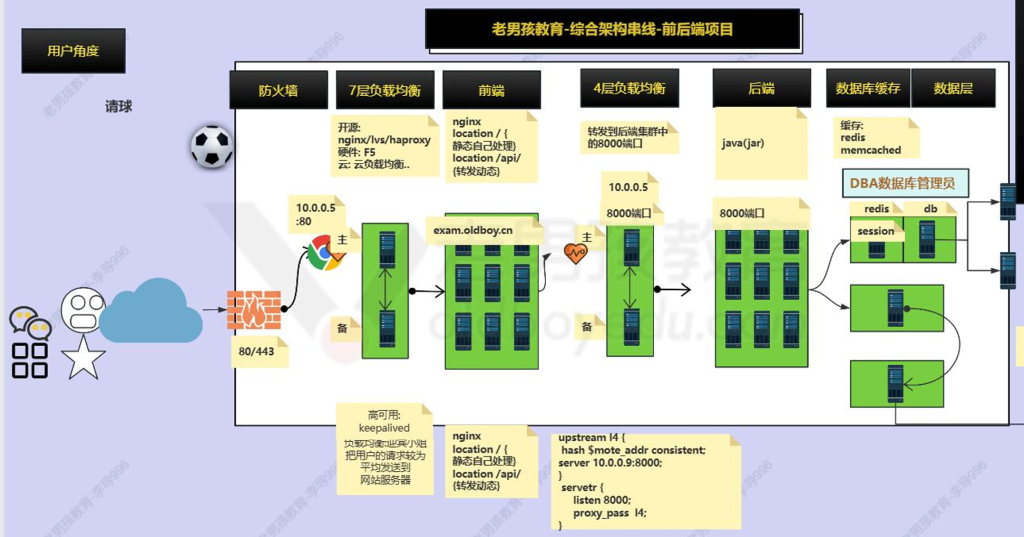
4层:传输层
7层:应用层
| 4层负载 | 7层负载 | |
|---|---|---|
| 说明 | 针对端口进行转发 | 针对http协议(域名,类型,uri….) |
| 选型 | 性能更高一些,端口转发使用 | 一般选择7层即可,web服务器,http协议 |
| 服务 | nginx,haproxy,lvs | nginx,haproxy |
| 角色 | 主机名 | ip | 服务 |
|---|---|---|---|
| 前端lb l7 | lb01 | 10.0.0.5/172.16.1.5 | ngx |
| 前端web | web01 web02 | 10.0.0.7/172.16.1.7-8 | ngx |
| 后端lb l4 | lb02 | 10.0.0.6/172.16.1.6 | ngx |
| 后端web | web03 web04 | 10.0.0.9-10/172.16.1.9-10 | jdk+jar包 |
| 数据库 | db02 | 10.0.0.52/172.16.1.52 | mysql 8.0 |
3.2后端web
书写systemctl文件http://159.75.135.202/2026/03/03/%e9%9b%86%e7%be%a4%e6%9e%b6%e6%9e%84-web%e9%9b%86%e7%be%a4-tomcat/
3.3后端4层负载
- stream区域 与http区域并列
- stream区域 4层
- http区域7层
- 检查ngx是否支持4层负载
nginx -V | & stream
–with-stream
–with-stream=xxxx 也不行
–with-stream
–with-stream=xxxx 也不行
进行配置http并列
stream {
upstream exam__hou_group {
server 10.0.0.9:8000;
server 10.0.0.10:8000;
hash $remote_addr consistent;
}
server{
listen 8000;
proxy_pass exam_hou_group;
}
}
upstream exam__hou_group {
server 10.0.0.9:8000;
server 10.0.0.10:8000;
hash $remote_addr consistent;
}
server{
listen 8000;
proxy_pass exam_hou_group;
}
}