一、html,css,js
- nginx自己处理的静态资源
- html,css,js
- 页面,样式(排版不局),特效
二、nginx日志
- 访问日志:记录与分析
- 错误日志:记录异常,系统异常使用
2.1访问日志
- log_format指令,指定nginx访问日志的格式
- access_log指令
2.1.1log_format
| log_fotmat指令 | 格式用法 |
|---|---|
| 格式: | log_format name [escape=default|json|none] string …; |
| 默认值: | lot_format combined “…”; 不推荐使用默认 |
| 上下文(指令可以放在那里) | http |
2.1.2 access_log 指定访问日志位置与使用格式
2.1.3 访问日志(变量)
| nginx变量(访问日志格式) | 说明 | 应用场景与获取到的信息 |
|---|---|---|
| $remote_addr | 客户端ip地址 | 经常关注,可以获取到访问情况 |
| $remote_user | 用户(nginx认证用户) | |
| [$time_local] | 时间 | |
| $request | 请求报文起始行 请求方法 URL http/1.1 | 关注POST请求,关注URL |
| $status | http状态码 | 200,301,302,304,4xx,5xx统计每个状态码的次数 |
| $body_bytes_sent | 从客户端返回数据大小 | 统计流量情况,统计宽带情况 |
| $http_referer | 用户如何访问地址(从哪里跳转过来的) | 用于用户从那里来(外部) 网站推广 |
| $http_user_agent | http请求1头中UA头,客户端浏览器 | 请求类型:win,ios,android,pad |
| $http_x_forwarded_for | xff头信息,记录用户真是ip | 接入负载均衡的时候,还需进行配置 |
| 额外加入的变量 | ||
| $request_method | 请求方法 | 限制,比如系统只通过GET,POST,HEAD,其他都拒绝 结合if使用 |
| $request_uri | 获取URL |

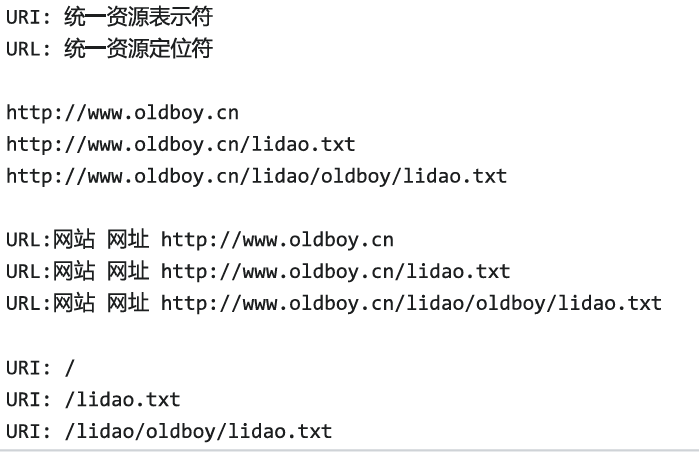
- 修改访问日志位置
cat /etc/nginx/conf.d/xbw.conf
server {
listen 80;
server_name game.oldboy.com;
root /code/;
access_log /var/log/nginx/xbw.access.log main;
error_log /var/log/nginx/xbw.error.log notice;
location / {
index index.html;
}
location ~* .(html|css|js)$ {
expires 30d;
}
location ~* .(jpg|png|gif)$ {
expires max;
}
location /admin/ {
auth_basic “input password”;
auth_basic_user_file /etc/nginx/pass;
}
error_page 404 /404.html;
location = /404.html {
root /code/errors;
}
error_page 403 /403.html;
location = /403.html {
root /code/errors;
}
error_page 500 502 503 504 /50x.html;
location = /50x.html {
root /code/errors;
}
}
server {
listen 80;
server_name game.oldboy.com;
root /code/;
access_log /var/log/nginx/xbw.access.log main;
error_log /var/log/nginx/xbw.error.log notice;
location / {
index index.html;
}
location ~* .(html|css|js)$ {
expires 30d;
}
location ~* .(jpg|png|gif)$ {
expires max;
}
location /admin/ {
auth_basic “input password”;
auth_basic_user_file /etc/nginx/pass;
}
error_page 404 /404.html;
location = /404.html {
root /code/errors;
}
error_page 403 /403.html;
location = /403.html {
root /code/errors;
}
error_page 500 502 503 504 /50x.html;
location = /50x.html {
root /code/errors;
}
}
2.2 错误日志
error_log /var/log/nginx/xbw.error.log notice;
最细——————————————————->粗略
debug,info,notice,warn,error,crit,alert,or emerg
默认是error
推荐notice
三、location规则
- location针对请求中的URL进行匹配判断
3.1 location 与符号
| location | 说明 |
|---|---|
| location / | 保底,默认规则 |
| location /文件名/ | 域名/文件名/路径 |
| location ~ 正则 | 使用正则匹配uri,区分大小写 location ~ \.(phg | jpg | jpeg | gif)$图片 |
| location ~* 正则 | 使用正则匹配uri,不区分大小写 |
| location ^~ 内容 | 进行uri匹配,过滤,不支持正则,优先级高 |
| location = 内容 | 精确匹配,优先级最高 |
3.2案例
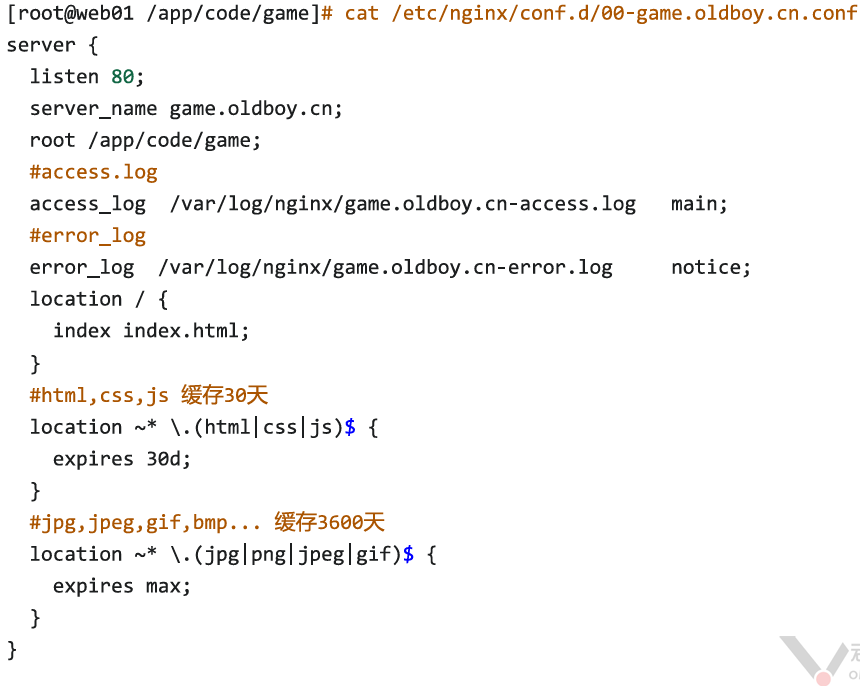
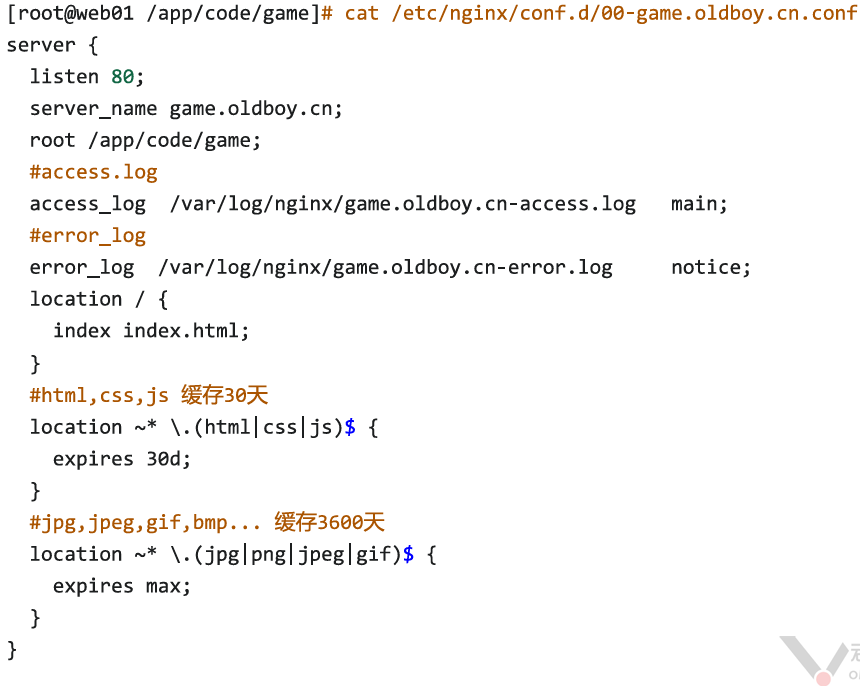
3.2.1给game站点指定资源添加缓存功能
expires缓存浏览器缓存
html,css,js 缓存30天
jpg,jpeg,gif,bmp… 缓存360天
jpg,jpeg,gif,bmp… 缓存360天
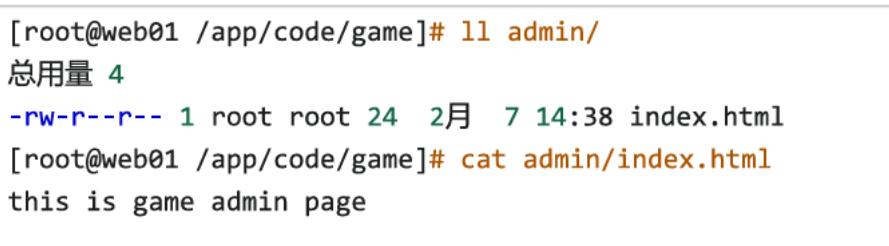
3.2.2 给game站点加上个/admin/目录页面,访问提示进入后台管理页面了
game.oldboy.cn/ 正常使用,不需要认证.
game.oldboy.cn/admin/ 需要验证
game.oldboy.cn/admin/ 需要验证
- 环境准备
- 修改配置文件
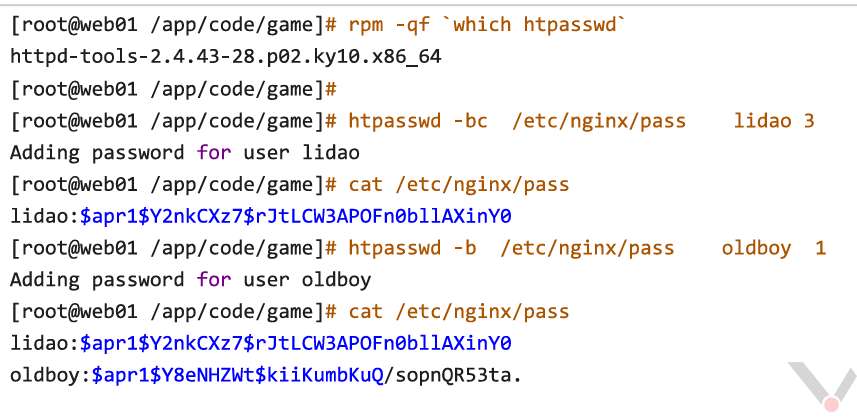
- 准备密码文件
3.2.3 给站点配置一个错误页面,遇到错误显示指定页面内容
#进入子配置文件
vim /etc/nginx/conf.d/game.oldboy.cn.conf
#内容
server {
listen 80;
server_name game.oldboy.com;
root /code/;
access_log /var/log/nginx/xbw.access.log main;
error_log /var/log/nginx/xbw.error.log notice;
location / {
index index.html;
}
location ~* .(html|css|js)$ {
expires 30d;
}
location ~* .(jpg|png|gif)$ {
expires max;
}
location /admin/ {
auth_basic “input password”;
auth_basic_user_file /etc/nginx/pass;
}
error_page 404 /404.html;
location = /404.html {
root /code/errors;
}
error_page 403 /403.html;
location = /403.html {
root /code/errors;
}
error_page 500 502 503 504 /50x.html;
location = /50x.html {
root /code/errors;
}
}
vim /etc/nginx/conf.d/game.oldboy.cn.conf
#内容
server {
listen 80;
server_name game.oldboy.com;
root /code/;
access_log /var/log/nginx/xbw.access.log main;
error_log /var/log/nginx/xbw.error.log notice;
location / {
index index.html;
}
location ~* .(html|css|js)$ {
expires 30d;
}
location ~* .(jpg|png|gif)$ {
expires max;
}
location /admin/ {
auth_basic “input password”;
auth_basic_user_file /etc/nginx/pass;
}
error_page 404 /404.html;
location = /404.html {
root /code/errors;
}
error_page 403 /403.html;
location = /403.html {
root /code/errors;
}
error_page 500 502 503 504 /50x.html;
location = /50x.html {
root /code/errors;
}
}